Preparing your Creative and Practice-Based Research Outputs
These research outputs (ROs) include a variety of creative outputs under 4 broad output types:
- Curated Exhibition/ Event or Festival
- Live Performance of Creative Work
- Original Creative Work
- Recorded or Rendered Work
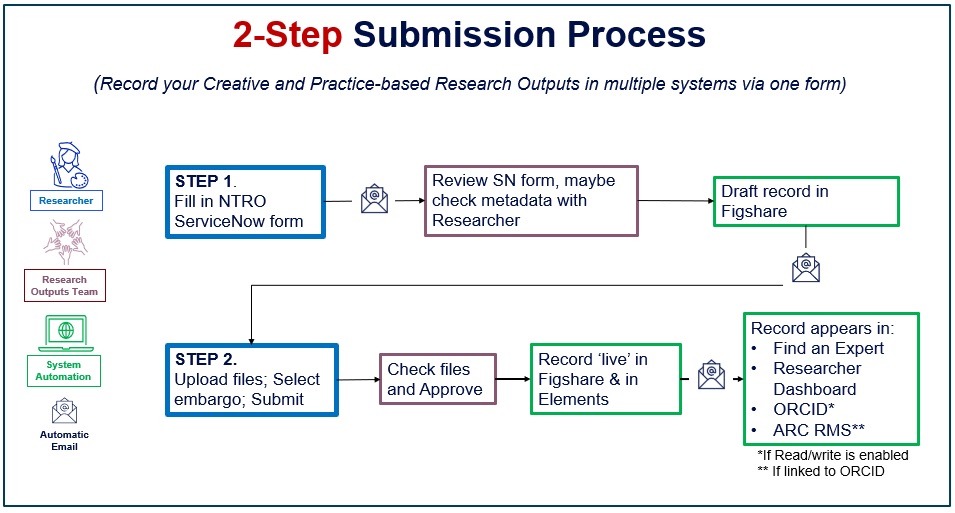
Add your creative and practice-based ROs to appear on your Melbourne Figshare and Find an Expert profiles via the two-step process:
Step 1: Complete the ServiceNow form
- Research Outputs team reviews metadata and creates a Draft Record in Melbourne Figshare.
- An email titled “Access Melbourne Figshare to complete the submission of your research output" will be sent to your inbox. The email contains a link to the Draft record for you to complete step 2.
IMPORTANT: Do not attach files to this form. You will be asked to upload files in Step 2.
Step 2: Upload your Evidence of Output files to the Melbourne Figshare draft record
- Collect all third-party permissions as required before uploading files.
- You have the option to upload files and/or apply an embargo as required before clicking the ‘Submit for Review’ button.
- The Research Outputs team will review files and metadata for record completeness before making the output live in Melbourne Figshare. It will update in Elements and Find an Expert within the next 48 hours.
Choosing Your Evidence of Outputs, Visibility and Configuring Melbourne Figshare
Research Evidence
| What You Have | Copyright Status | Recommended Figshare Approach |
|---|---|---|
Your own files (images, video, docs) | You own the copyright | Upload files; choose embargo if you do not want public access; use Research Statement and metadata. |
Third-party files (festival media, etc.) | You do not own the copyright | Upload files under embargo as internal evidence only; clearly note third-party source; optionally add URLs. |
No files | Not applicable | Create a metadata-only record; use Research Statement and metadata to describe the output; add URLs to public listings if available. |
Public Visibility
| What You Have | Copyright Status | Recommended Figshare Approach |
|---|---|---|
Your own files (images, video, docs) | You own the copyright | Upload files and make them public; select an appropriate licence; use DOI for sharing and citation. |
Third-party files (festival media, etc.) | You do not own the copyright | Either obtain permission and then make files public, or do not upload files and instead add links/URLs to the original source. |
No files | Not applicable | Create a metadata-only record; use Research Statement and metadata; add URLs to external documentation (e.g. programme, catalogue). |
Click here for ServiceNow Form Explainer