Community Members
Visiting the library
Members of the public are welcome to visit our libraries to browse collections and use our public library spaces.
Available to the public
- Libraries during opening hours
- Public access computers
- Printing, photocopying and scanning as a guest user
Not available to the public
- After hours study zones
- Library computers
- Wifi (unless the user is part of eduroam or the visitor network)
- Bookable rooms
Public access computers
Visitors can visit one of our libraries to access many of our online resources via a public access computer. These resources are made available in our libraries under special licences provided by the publishers. You can ask a library staff member to direct you to the assigned public access computer.
Please note that internet browsing, word processing and access to personal email are not available from these or any other library computers.
Available to the public
- Library Search
- eJournals and databases with walk-in user licences
Not available to the public
- General internet access
- Office software
Library membership
Sign up for free community membership to borrow physical items like print books from the library. You will need to be over the age of 18, with photo ID and proof of address.
Community memberships are for 12 months from the date of registration (unless otherwise specified) and can be renewed on request. If you are unable to renew your membership in person, please contact the library to make alternative arrangements.
If your home institution is a participating member of the CAVAL or ULANZ reciprocal borrowing schemes, you do not need to complete a community membership form. To register for, or renew, a CAVAL or ULANZ membership, simply visit one of our libraries with your student or staff ID and proof of enrolment or employment. Your account will be valid until 28 February of the following year.
Apply online
- Download and complete the library membership form.
- Attach the completed form to the Library Enquiries webform. Use the subject line 'Community membership'.
- We will contact you by email when your membership has been processed. This can take up to 3 business days. Once you receive confirmation, collect your library card in person from the Baillieu Library (unless specified otherwise). Please bring photo ID and proof of address when collecting your card and check our library opening hours ahead of your visit.
Apply in person
- Visit any of our libraries to sign up for community membership on the spot. Please bring photo ID and proof of address, and check our library opening hours ahead of your visit. You may wish to print out and complete the library membership form before you come in (optional).
Membership types and borrowing limits
Depending on your community membership type, you will be able to borrow up to 30 or 100 items from our physical collection. See below for community membership types and associated borrowing limits.
-
Staff members of an affiliate institution or Committee of Convocation will be able to borrow up to 100 items. Please see the list below for eligible affiliate institutions.
Number of loans Renewals General collection High Use and 7-day loans Journals Media (CDs and DVDs) Kits Scores Electronic resources Interlibrary loans 100 items 4 times 28-day loans No No 28-day loan CDs and DVDS only; no software No Yes Available via public access computer only No Eligible affiliate institutions Austin Health Institute of Postcolonial Studies Royal Children’s Hospital Australia and New Zealand School of Government International House Royal Victorian Eye and Ear Hospital Australian Antarctic Division Janet Clarke Hall Skin and Cancer Foundation Australia Australian College of Optometry Leo Cussen Institute St Hilda's College Australian Institute of Family Studies Melbourne Health St Mary's College Baker Heart and Diabetes Institute (Baker Institute) Melbourne Theatre Company St Vincent’s Health Bionics Institute Murdoch Children's Research Institute St Vincent's Institute of Medical Research Bureau of Meteorology Museums Victoria Trinity College Burnet Institute National Ageing Research Institute UMSU Cancer Council Victoria Newman College University College Centre for Eye Research Australia Northern Health University of Divinity (please see separate membership information) CSIRO Ormond College Victorian Institute of Forensic Medicine Epworth HealthCare Peter MacCallum Cancer Centre Walter and Eliza Hall Institute of Medical Research The Florey Phoenix Australia (Australian Centre for Posttraumatic Mental Health) Wilam Hall Goulburn Valley Health Queen's College The Women’s (Royal Women’s Hospital) Grattan Institute Royal Botanic Gardens Victoria Zoological Parks and Gardens -
University of Melbourne Alumni can borrow up to 100 items. For further information visit our Alumni Library Services page, including information on how to purchase an eJournal subscription.
Number of loans Renewals General collection High Use and 7-day loans Journals Media (CDs and DVDs) Kits Scores Electronic resources Interlibrary loans 100 items 4 times 28-day loans No No 28-day loan CDs and DVDS only; no software No Yes eJournal subscription available for purchase No -
Visiting academics or scholars who are working in collaboration with the University of Melbourne, but who are not eligible for a University of Melbourne staff card, can register as a library member to borrow up to 100 items.
Number of loans Renewals General collection High Use and 7-day loans Journals Media (CDs and DVDs) Kits Scores Electronic resources Interlibrary loans 100 items 4 times 28-day loans No No 28-day loan CDs and DVDS only; no software No Yes Available via public access computer only No -
If your home institution is a participating member of the CAVAL or ULANZ reciprocal borrowing schemes, you will be able to borrow up to 30 items. You are not required to complete a community membership form. To register or to renew a CAVAL or ULANZ membership, simply visit a library branch in person with your student or staff ID and proof of enrolment or employment.
Number of loans Renewals General collection High Use and 7-day loans Journals Media (CDs and DVDs) Kits Scores Electronic resources Interlibrary loans 30 items 4 times 28-day loans No No 28-day loan CDs and DVDS only; no software No Yes Available via public access computer only No -
Members of the public can borrow up to 30 items.
Number of loans Renewals General collection High Use and 7-day loans Journals Media (CDs and DVDs) Kits Scores Electronic resources Interlibrary loans 30 items 4 times 28-day loans No No 28-day loan CDs and DVDS only; no software No Yes Available via public access computer only No -
Dalton McCaughey library members can borrow up to 30 items. To register, you will be required to provide a letter of introduction from the Dalton McCaughey Library on an official letterhead.
Number of loans Renewals General collection High Use and 7-day loans Journals Media (CDs and DVDs) Kits Scores Electronic resources Interlibrary loans 30 items 4 times 28-day loans No No 28-day loan CDs and DVDS only; no software No Yes Available via public access computer only No -
Former University of Melbourne staff members can borrow up to 30 items.
Number of loans Renewals General collection High Use and 7-day loans Journals Media (CDs and DVDs) Kits Scores Electronic resources Interlibrary loans 30 items 4 times 28-day loans No No 28-day loan CDs and DVDS only; no software No Yes Available via public access computer only No -
Kwong Lee Dow Young Scholars are able to borrow up to 30 items. Note: Kwong Lee Dow Young Scholars will be registered as part of the Kwong Lee Dow Young Scholars Program and do not need to complete the community membership form.
Number of loans Renewals General collection High Use and 7-day loans Journals Media (CDs and DVDs) Kits Scores Electronic resources Interlibrary loans 30 items 4 times 28-day loans No No 28-day loan CDs and DVDS only; no software No Yes Available via public access computer only No -
University of Divinity staff and students can borrow up to 30 items. To register, you will need to provide proof of current employment or enrolment.
Number of loans Renewals General collection High Use and 7-day loans Journals Media (CDs and DVDs) Kits Scores Electronic resources Interlibrary loans 30 items 4 times 28-day loans No No 28-day loan CDs and DVDS only; no software No Yes Available via public access computer only No -
Staff and students visiting from an international university can borrow up to 30 items. You will be required to provide a letter of endorsement from your university that must include the following:
- If you are a student, an indication that you are currently enrolled and are in good standing with your home institution library and have no penalties or restrictions associated with your account
- If you are a staff member, you are currently employed at the home institution and have no penalties or restrictions associated with your account
- A statement that your home institution is willing to indemnify you against any losses or fines incurred that are not resolved upon you leaving
- The required membership period according to the indemnity clause
- Contact details for someone at your home institution who we can contact if we need to follow up
Number of loans Renewals General collection High Use and 7-day loans Journals Media (CDs and DVDs) Kits Scores Electronic resources Interlibrary loans 30 items 4 times 28-day loans No No 28-day loan CDs and DVDS only; no software No Yes Available via public access computer only No
Terms and conditions
By registering for a community membership and signing your borrower card, you agree that you will:
- Regularly check your email for notices from the Library
- Return your loans by their due date
- Accrue fines for items that have been requested by another patron if you do not return them by the new due date (within 7 days)
- Pay fines if your total fines amount to $125 or more (see Fines and Suspensions for more information)
- Care for borrowed items and return them in the same condition in which they were borrowed
- Accept responsibility for any costs associated with replacing or repairing library items lost or damaged by you
- Return items before any extended absence, including travel
- Notify the Library of any changes to your personal information that require updating in our system
- Acknowledge that the Library may suspend or revoke your membership if these terms and conditions are not met
Logging into your library account
-
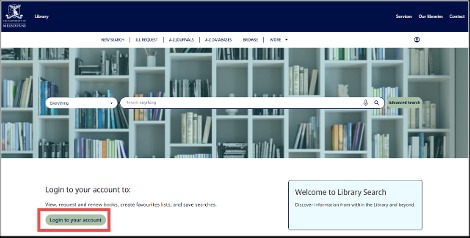
On Library Search, click 'Login to your account'
-
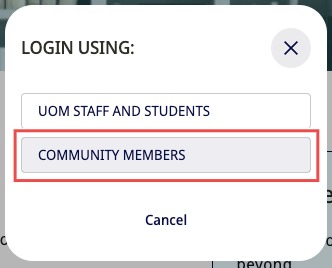
Select 'Community Members'
-
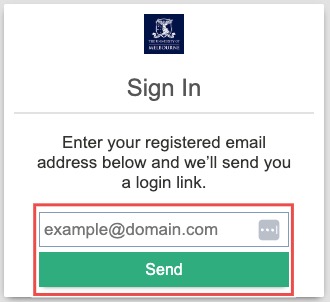
Enter your library account email and click Send
If you’re unsure which email to enter please contact the library.
-
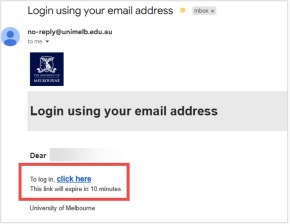
Open the email and click the link
The link is valid for 10 minutes.
For assistance or further information, contact the Library via Library Chat or the Library Enquiries Form.