Use the web library
Use the Zotero web library
It is possible to access, edit and annotate your Zotero library on a mobile device via the Zotero web library. You can download PDFs and read and annotate them on a phone or tablet.
Add items to your Zotero library
- Open your web library by logging into your Zotero account on your device
- Select your library, or the collection to which you wish to add items
- Press the three dots on the top banner of the screen
- Choose from the options: New item, Add by Identifier Upload File etc.
NOTE: using the Zotero connector to add items is not an option in the web
Add citations to a document
- Open your web library by logging into your Zotero account on your device
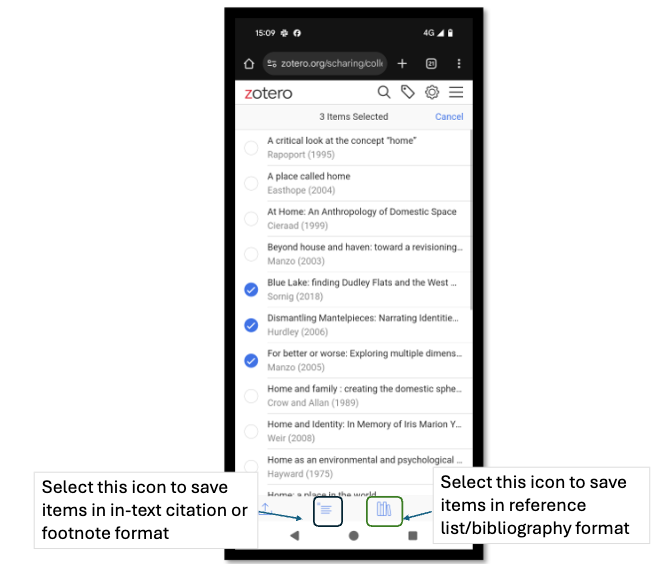
- Do a long press on an item to make selection options appear
- Select the item/s you want to cite
- Select whether you want a citation (icon with horizontal lines) or bibliography/reference list entry (icon that looks like books lined up next to each other).
- Select your citation style by tapping on the name of the style at the top of the screen and selecting from the list that pops up. If the style you require isn't in the default list, select the last option "10, 500+ other styles, to access all available styles.
- Select Create (appears on the top right hand side of screen)
- Paste the citation or reference into your document.
- Edit if necessary.