Organise store and backup data
File management 101
File management refers to methods for storing, organising, naming, discovering, and retrieving files in a structured consistent manner. Good file management practices will enable you to identify, locate, and use your research data files and materials efficiently and effectively. It will also contribute to the future proofing of your files over time for personal re-use and possible sharing with other researchers.
File naming
We all use many personal storage and retrieval systems in our everyday life, such as a specific location for car keys, a 'safe place' for important paper documents, a date-based filing system for tax items. When you are dealing with large amounts of data that may go into storage for a long time, you should use a consistent system of naming and filing the data, which will be easy to follow when needed.
Consistent data naming and filing ensures that data files and materials are easier to:
- Locate and browse.
- Sort in a logical sequence.
- Retrieve, even if they are moved to a different platform or location.
- Distinguish from each other, including different versions.
- Identify and avoid accidental overwriting or deletion.
- Share and work on with multiple people now, and into the future.
-
Generally about 25 characters is sufficient to capture enough descriptive information for naming a data file.
Inappropriate example:
SoilTemperature01December2024VersionOne.csv
Better example:
SoilTemp_2024-12_v01.csv -
For example: ?\!@%{}<>. These are often used for specific tasks in different operating systems. Do not use full stops or blank spaces: use underscores instead.
Inappropriate example:
SoilTemp{Data}@site#01.csv
Better example:
soilTempData_Site01.csv -
The filename should include sufficient descriptive information to identify it, no matter where it is stored. Do not use generic file names that may conflict when moved from one location to another.
Inappropriate example:
Soiltemp.dat
Better example:
SoilTempData_Site05.csv -
For example, if you want to include a site number, do not limit the number to one digit (as you will only be able to have a maximum of nine sites).
Inappropriate example:
soiltempdata_Siye01a.csv
soiltempdata_Siye01A.csv
Better example:
SoilTempData_Site01_a01.csv
SoilTempData_Site01_a02.csv -
For example, if you use the format: YYYY-MM-DD, (Y = Year, M = Month, D = Day) it will be easier to sort your files by date.
Inappropriate example:
SoilTemp_2025-12-01.csv
SoilTemp_12-December.csv
SoilTemp_Jan-05-26.csv
Better example:
SoilTemp_2025-12-01.csv
SoilTemp_2025-12-12.csv
soilTemp_2026-01-05.csv -
Do not rely on case when naming different files. For example, assume that TANGO, Tango and tango are the same.
Inappropriate example:
soiltempdata_Site01a.csv
soiltempdata_Site01A.csv
Better example:
SoilTempData_Site01_a01.csv
SoilTempData_Site01_a02.csv -
Where possible, use file extensions to accurately reflect the software environment in which the file was created and the physical format of the file. For example: .xls or .xlsx for Excel files, and .txt for text files.
Inappropriate example:
SoilTempData_Site01
Better example:
SoilTempData_Site01.csv
Document your naming conventions
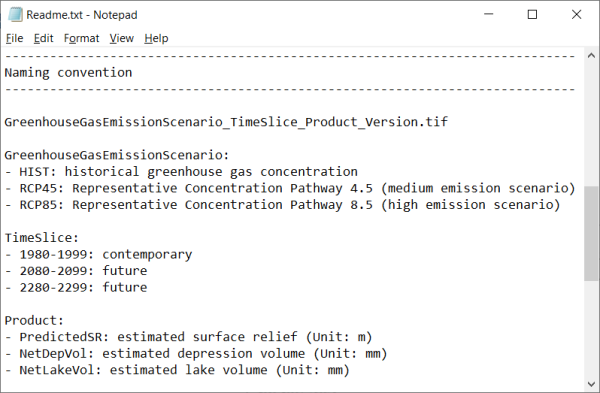
Make sure that you document any file naming conventions that you use. This becomes more critical over time with changing standards and research practices. Use a readme.txt (text) file or a Standard Operating Procedure (SOP) file to explain your file naming conventions, including any codes or abbreviations you use.
These documents are often used as "walkthroughs" to outline not only file naming conventions, but also to define research methods and procedures.
Documenting your file naming conventions will help you to:
- Name files consistently.
- Remember what the filenames mean in the future.
- Train new researchers joining your research group.
- Explain your data to, and share it with, other researchers.
For example:
Discover more about best file management woth the open educationl resource (OER) File Management 101
Version control
Another key component of effective file management is consistent version control. It is important to identify and retain different versions of your files as you work on them. This ensures that a clear audit trail exists for tracking the development of a data file and identifying earlier versions when needed. At its most basic level, this could be a clear sequence of your thesis drafts, allowing you to go back and revisit sections and ideas that you may have revised, deleted or moved. You will need to establish a method that makes sense to you but that would also allow others to identify the different versions of your data files.
Manual versioning is where you adopt a versioning process that may include manually adding incremental numbers to the name of each draft version of a file, such as 0.1, 0.2, 0.3 etc. Using version numbers is a great way to keep track of the latest as well as previously saved versions of your files. Some people also like to annotate the changes with each new version of a file and might include words like major or minor in the file name.
- Record every change, however minor that change may seem at the time.
- Beware of using confusing labels: revision, final, final2, definitive_copy, as you may find that these accumulate: what you think is the final version may require a later revision.
- Discard or very clearly label versions of files that are obsolete (while retaining the original 'raw' copy).
- Turn on versioning or tracking in collaborative documents or storage utilities such as Wikis, GoogleDocs, etc.
- Examples of maintaining version control would include: [document name] [date] [version number] [status: draft/revision/submitted]:
- Smith_interview_161029_v01_draft
- Smith_interview_161108_v02_revised
Automated version control is where you use a system or platform to generate new versions of a file. Some systems require selective intervention to commit changes and generate new versions of a file, while others automatically save versions of your files behind the scenes.
Git and Electronic Notebooks are two open source platforms that can be used to implement version control into your research data management practice.
Git is a free open-source platform often used to store, share and distribute source code. A git repository allows users to synchronise work created on a local repository (a hard drive) with a repository located on a remote server. Users can commit new versions of their output to the remote server and rollback to previous versions when an error occurs.
Electronic Notebooks (ELN) are a great way to record, manage and store research data. At the University of Melbourne staff and graduate research students can access the ELN LabArchives. Edits made to outputs on this platform are stored as reversions using a timestamp, the name of the user to make the change and IP address of the user. Accessing or reverting to previous versions of outputs keep all other versions intact so users can move back and forward as required.
Other University supported Apps that automatically track versions of documents are Microsoft 365 Apps such as OneDrive, Teams and SharePoint
Data file formats
The formats you use to generate your research data files and digital materials will influence the management of these files over time, ie a program or application must be able to recognise the file format in order to access data within the file. For example, a web browser can process and display an HTML (Hyper-Text Markup Language) file as a web page. If the browser encounters another file type, it may need to use a plug-in to open it, or you may have to download the file and open it in another program.
Files usually have a filename extension, or suffix that follows a full stop in the filename and contains three or four letters that identify the format for example:
- txt- text file
- pdf- Portable Document Format (PDF)
- jpg or jpeg - Joint Photgraphic Experts Group (JPEG)
- csv -comma separated values file
- asc - ASCII text file
- html - HyperText Markup Language file
- xml- eXtensible Markup Language file
- rtf - Rich Text Format.
Operating systems may handle file extensions differently:
- For example, Windows hides file extensions by default but you can change this setting via the Control Panel. Files from Mac OS versions prior to OS X did not have file extensions. This can cause problems if you try to use them with other operating systems.
- File formats may be proprietary and closed, or open and published for anyone to use. Open formats make files easier to access because a number of freely available software applications can open them. Open standard formats in broad use today are more likely to be accessible into the future because they have a broad community of users and are often based on agreed international standards. This is particularly important for the re-use and sharing of your data in the future.
It is recommended that you use open standard formats for your research data. If this is not possible, try and store another copy of your data in an open format. For example, you might use Adobe Illustrator to create images for publication, but by saving an additional copy in an open format (such as .svg) file you will ensure that your data will be readable into the future. Check out theDigital Preservation and theOpen Data websites for more information.
Storage and security
Your decisions about where you store your research data and materials are very important.
Storage options
The information provided in this section relates to researcher needs for data storage during the active phase of research projects.
The University of Melbourne offers several data storage and management services that support diverse workflows, meet compliance obligations and protect against data loss. Choosing the right research data system(s) can help you meet your research responsibilities and a good place to start is theResearch Data Management System Finder, which allows you to search, filter and compare recommended systems and tools available at the University.
If you are still unsure which data storage option will be the most suitable for your research project, it is suggested that you discuss the options with your supervisor and/or seek advice from Research Computing Services.
| Storage type | Benefits | Risks |
|---|---|---|
| Online cloud-based services | Using one of the University’s cloud based services such as OneDrive or SharePoint makes it easy for you to access your data and files from multiple devices or platforms and form any location (that has internet access). SharePoint and OneDrive are accessed using the University’s Multifactor Authentication (MFA) adding an extra layer of security to these platforms. Allows you to share your data and collaborate with others, some platforms allow for real time editing with collaborators. Cloud-based services typically provide versioning and audit trail capabilities for your research data, enabling you to track changes, and ensure data integrity over time. University managed cloud based services store research data on servers located within Australia, allowing you to comply with regional data requirements and regulations | Risks are managed by the University who provide regular monitoring of university systems and back-up of information and data for cloud based services. Cloud storage can be a prime target for hackers and unauthorised access can occur if you are not managing access controls and permissions correctly within cloud platforms. If you are working with large volumes of complex data, M365 platforms (e.g. OneDrive and SharePoint) may not be able to accommodate storage volume requirements and complex, non-MS supported formats. Upon completion of your tenure/enrolment at the University you will no longer have access to the networked drive and your data should be transferred to a platform such as Attica where it can be maintained by the University for the specified retention period. |
| Networked drives | Networked drives store data on a remote device/server. The data is accessed through your local device i.e. laptop or computer, where access speeds can be faster (especially over wired Ethernet). Networked drives are ideal for large files, high volume workflows and generally provide back-up and versioning for data as well as user-controlled access and sharing options. | Risks are managed for you by the University, using controlled access, regular snapshots to safeguard against data loss and disaster management across the University’s data centres. Network drives should not be used for longer term storage and retention of research data. Upon completion of your tenure/enrolment at the University you will no longer have access to the networked drive and your data should be transferred to a platform such as Attica where it can be maintained by the University for the specified retention period. |
| Personal computers and laptops | A personal computer or laptop is a convenient way to store your data during a research project. | Local drives may fail, or laptops may be lost, stolen or damaged, resulting in loss of your data. Personal computers need to be backed up regularly. |
What is your backup strategy?
Backup strategies help reduce the risk of data loss. When selecting a system or platform for your data management needs, it is important to understand if the system provides data recoverability. While many university-provided research data management (RDM) systems offer data recovery capabilities, it is important to confirm this feature is available to help mitigate potential data loss in the event of unforeseen circumstances.
Some questions to consider:
- How often is data backed up?
- Will all data be backed up (full backup) or just what has changed (incremental)?
- How long will back-ups be stored?
- What devices will be used for back-up?
- How will versioning be managed?
Additional information for non-digital data
Depending on the types of data generated as part of your research project you may consider the possibility of digitising non-digital data if it is highly likely the data will need to be regularly referred to in future. If you decide to do this, be sure to include your digitisation planning within your DMP.
The Records & Information website provides guidance and requirements on digitising University records, including research data.
The University of Melbourne also has a digitisation centre. The University Digitisation Centre (UDC) provides expert advice, training and a range of digitisation services. The UDC have a self-service, so if you have research materials that you want to digitise, you can visit their website and book a time to go in and use their digitisation space.
Sensitive data privacy considerations
Sensitive research data is data that has the potential to cause significant harm if disclosed to or accessed by unauthorised parties, whether by accident (e.g., through mismanagement) or malice (e.g., through cybersecurity attacks).
Ensuring appropriate processes and security controls are used during the collection, storage, analysis, and retention of your sensitive research data will protect against these harms and help you meet your ethical and regulatory requirements.
If your data contain confidential intellectual property, commercial data storage services should only be used if you have evaluated the risks and are not in breach of your funding agreement or institution’s policy.;The University’s Privacy Policy (MPF1104) requires that privacy considerations are embedded into the design of all research processes – including storage, and applies to all areas of the University.
The University’s Privacy team can assist with Privacy Impact Assessments (PIAs) for new or amended projects that include or may include individuals' personal information.;A PIA is a process to evaluate how a project, system or activity may impact the privacy of individuals. It helps to identify privacy risks and enables the development of risk mitigation strategies.
Sensitive data storage considerations
Before you decide where to store your research data, it is important to know if your data contains sensitive information and how to manage your data in accordance with the University’s sensitive data classification levels. The University’s Research Data Classification Framework and Tool can help you determine a classification level for your research data. Classifying your data will help you make informed decisions about how to safeguard your data against disclosure or access by unauthorised parties.
The University has a list of recommended systems for the management and storage of data. Knowing the classification level for your data will further inform your decision on where to store your research data. The list offers recommendations for storing data, ranging from data that presents negligible risk to data with a classification level that poses significant risk.